Choosing the Chat Model
Letting the AI pick its own model beats making you guess.
The chat input has a model tier selector on the right with four options: Auto / Basic / Pro / Expert.
It renders as a pill showing the short label of the active tier; click to open the picker.
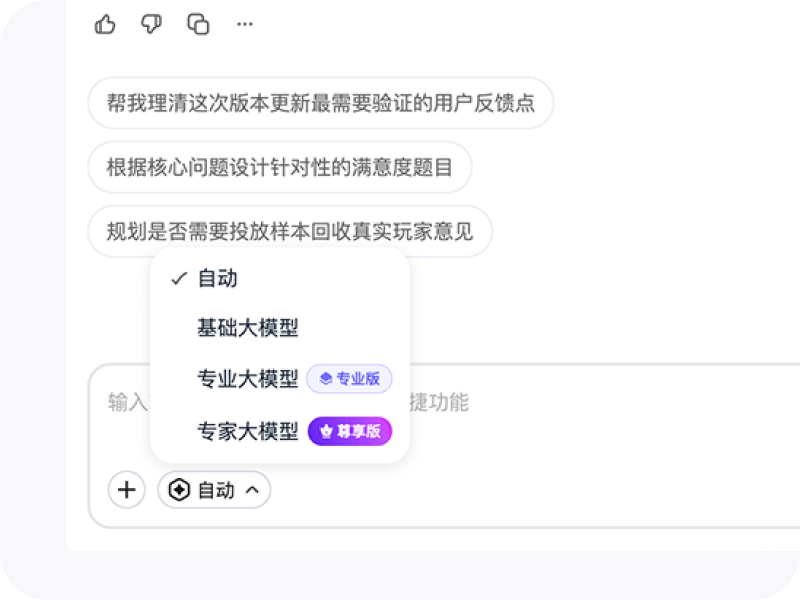
What each tier is for
| Tier | Positioning | Best for |
|---|---|---|
| Auto | Backend picks the model by task difficulty — points-efficient by default | Most day-to-day chats and research iteration |
| Basic | Speed-first, low point consumption | Quick Q&A, command-style tasks, light rewrites |
| Pro | Balanced reasoning and writing | Survey design, analysis plans, report drafting |
| Expert | Strongest overall capability | Complex intent clarification, rigorous academic / market research, long-context recall |
Defaults and subscription mapping
The set of tiers you can pick depends on your subscription plan:
- Free — defaults to Basic; Auto / Pro / Expert prompt you to upgrade
- PRO — defaults to Auto; can switch to Basic / Pro
- VIP / Enterprise — defaults to Auto; can switch to Basic / Pro / Expert
Quick mental model: Auto picks the strongest model your plan allows. The higher your plan, the more powerful the ceiling Auto can use.
Per-conversation memory
Each conversation remembers the last tier you manually picked:
- Refresh the page or come back to the same conversation → your previous tier is restored
- Start a new conversation → defaults kick in again (based on your membership)
- Tier memory lives in browser local storage; it doesn’t sync across devices
Tier badges during streaming
In Auto mode, the actual underlying model isn’t known until streaming starts. To avoid showing an ambiguous “Auto” with no badge on the message, when the AI emits a model_selected event the tier badge for the actual model lights up early. If you switch conversations or restart a turn mid-stream, the badge reflects the tier truly chosen for that turn — no leftovers from the previous one.
Where to find it
- Desktop — bottom-right pill on the chat input
- Mobile — tier button on the right of the input, picker rises from the bottom
- The chat input embedded inside the editor supports it as well
If you’re not sure what to pick, leave it on Auto — that’s also the default for paid users.